
- Posts: 5
Postings
You can freely browse the forum and post in the community forum.
However, you need a valid license to write posts for support (own a valid commercial software license or have purchased a support membership).
Posts only show once reviewed. This is mainly preventive to keep spam away. Thank you for your understanding!
Module not displaying caption in IE8 or IE9
- hoggann
-
 Topic Author
- New Member
-

Less
More
IP: 202.138.29.158
13 years 4 months ago #2423
by hoggann
Module not displaying caption in IE8 or IE9 was created by hoggann
Hi, Great module, thanks for the hard work.
I have a small problem in that the module is not displaying the caption in Internet Explorer 8 or 9. Is there some code that I can add to my CSS to remedy this problem?
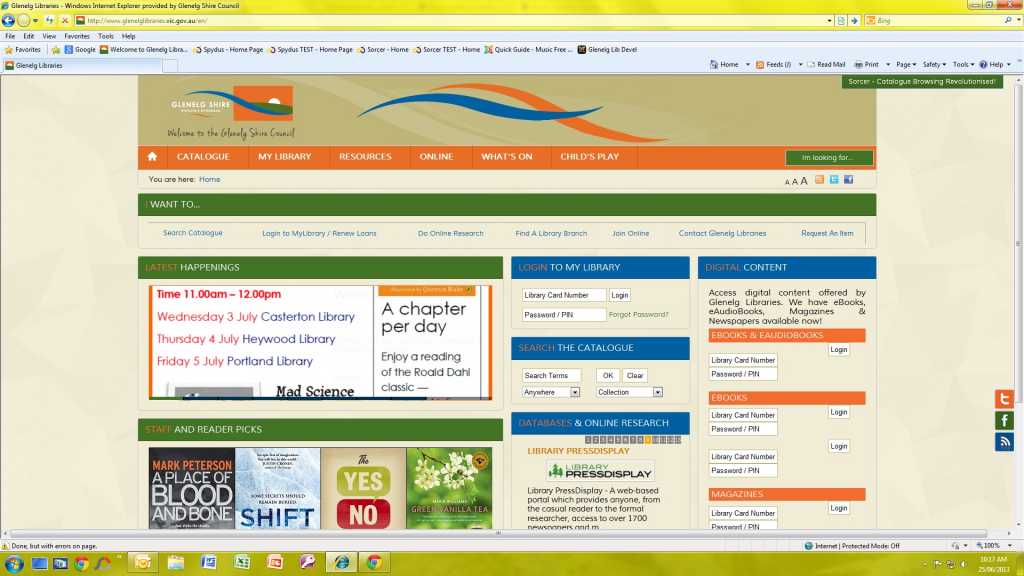
My site is: www.glenelglibraries.vic.gov.au if you wish to see for yourself. Below are screenshots of the site in IE8 and Chrome to show the difference.

Thanks
Nick
I have a small problem in that the module is not displaying the caption in Internet Explorer 8 or 9. Is there some code that I can add to my CSS to remedy this problem?
My site is: www.glenelglibraries.vic.gov.au if you wish to see for yourself. Below are screenshots of the site in IE8 and Chrome to show the difference.
Thanks
Nick
- admin
-

- Administrator
-

Less
More
- Posts: 1931
IP: 207.229.172.231
13 years 4 months ago #2424
by admin
Olivier.
Replied by admin on topic Re: Module not displaying caption in IE8 or IE9
Hello Nick,
you put the finger on a very interesting issue.
This slider has been created to work on Responsive templates.
Which means: it uses media queries in its CSS output.
Internet Explorer 8 and 7 cannot handle media queries (they are too old). Good responsive templates usually remedy to that problem by adding a specific javascript library such as 'css3-mediaqueries.min.js', which adds media queries functionality to IE 7 and 8.
I must admit I have forgotten to add this explanation in the documentation.
So what you need to do is add the above library (you will find it easily by just using Google search) to your template (in index.php).
Now I am thinking I should propose this advanced option in the slider module itself to take care of this issue for users who do not use the slider in a responsive template.
Once the library added, you should see some differences. But in your case, you won't be done, you will need to tweak the CSS a little for IE7 and 8, as the default right now is a clear background for the caption (IE7 and 8 also do not handle opacity correctly). You will have to make the background black since you are using caption over images that have text. But I can try and help you do that once the first issue is resolved
Olivier.
- hoggann
-
Topic Author
- New Member
-
Less
More
- Posts: 5
IP: 202.138.29.158
13 years 4 months ago - 13 years 4 months ago #2425
by hoggann
Replied by hoggann on topic Re: Module not displaying caption in IE8 or IE9
Thanks very much. I'll have a deeper look into it this afternoon.
FYI, It's not appearing on IE9 either but is on IE10.


FYI, It's not appearing on IE9 either but is on IE10.
Last edit: 13 years 4 months ago by admin.
- admin
-
- Administrator
-
Less
More
- Posts: 1931
IP: 207.229.172.231
13 years 4 months ago #2426
by admin
Olivier.
Replied by admin on topic Re: Module not displaying caption in IE8 or IE9
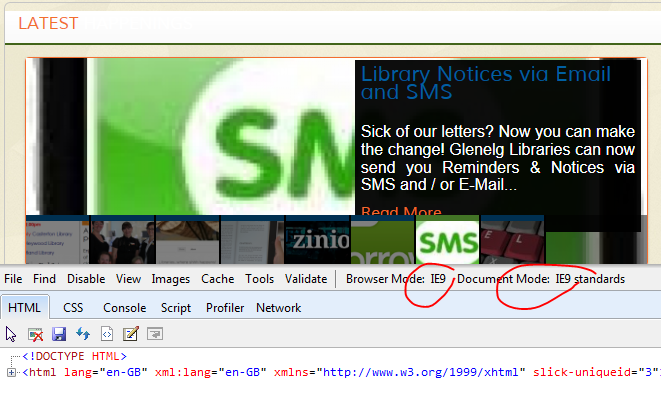
I am surprised, it does work for me in IE9 (IE10 in IE9 mode).
Olivier.
- hoggann
-
Topic Author
- New Member
-
Less
More
- Posts: 5
IP: 202.138.29.158
13 years 4 months ago - 13 years 4 months ago #2436
by hoggann
Replied by hoggann on topic Re: Module not displaying caption in IE8 or IE9
Thanks very much, I THINK I've got the media queries javascript up and loaded. I added some additional code to the CSS and it seems to work well on all our IE9 browsers now at least.
What's involved in the work for IE8?
What's involved in the work for IE8?
Last edit: 13 years 4 months ago by admin.
- admin
-
- Administrator
-
Less
More
- Posts: 1931
IP: 207.229.172.231
13 years 4 months ago #2438
by admin
Olivier.
Replied by admin on topic Re: Module not displaying caption in IE8 or IE9
Once the media queries javascript library installed, you should not have to do anything other than adding the background color desired for the caption in the CSS file:
.caption .innercaption line 401 of style.css.php
.caption .innercaption line 401 of style.css.php
Olivier.