Setup inline items in Latest News Enhanced Pro - Revisited in 7.4
Information
First published February 19, 2026
10507 hits-
In certain situations, whenever your requirements ask for each item to open under the list of items created by Latest News Enhanced Pro, it is possible to use the option link to : inline item.
Although this option should really be used with a limited number of items (all data is loaded at once in this early version), it can satisfy some additional use cases.
Phosfluorescently underwhelm mission-critical total linkage for premium opportunities. Synergistically reinvent business services vis-a-vis turnkey benefits. Authoritatively re-engineer excellent markets before efficient leadership. Monotonectally integrate timely functionalities via parallel vortals. Intrinsicly myocardinate cost effective markets through corporate action items.
Holisticly fabricate highly efficient.
Feature 2
Information
John Doe
Interactively integrate emerging solutions rather than state of the art leadership skills. Seamlessly leverage other's clicks-and-mortar methods of empowerment through competitive e-tailers. Credibly procrastinate principle-centered total linkage with.
Feature 3
Information
John Doe
Uniquely provide access to B2C partnerships vis-a-vis cross functional intellectual capital. Seamlessly morph professional outsourcing and backward-compatible content. Dramatically conceptualize integrated customer service before intuitive human capital. Progressively brand progressive experiences before excellent processes. Objectively grow strategic ROI via principle-centered partnerships.
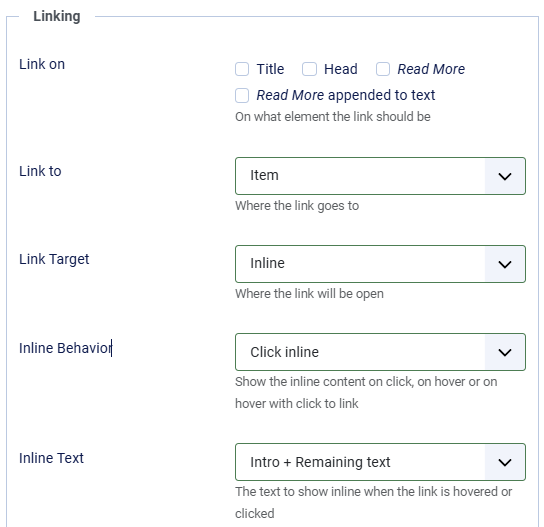
Step 1 Go to the layout tab -> linking section. Set the parameter Link Target to inline.
The parameters for inline items
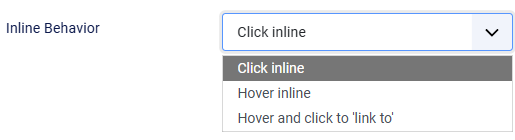
New Choose the behavior to give to the inline items. Click, hover or use hover with click to another area of the site or even to another site.
The behavior parameter for inline items
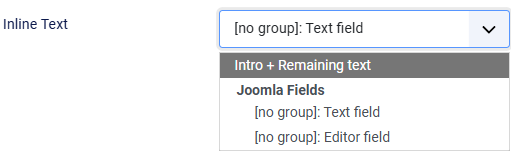
New Choose the text to show. It can be the article content, or any custom field of type 'Text', 'Textarea' or 'Editor'.
The text parameters for inline items
Step 2 There is no step 2. You are kidding, right, that's it? Yep. That's it.
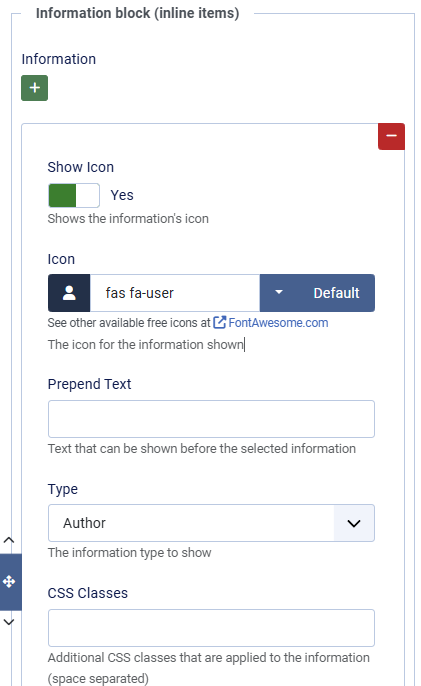
Step 3 Well, if you want, you can add a couple details to the text. Go to the Information tab -> Information block (inline items) section. Set the information details you desire to show (like author, date...).
The author information for inline items
Limitations:
You cannot use social icons, readmore and comments information details. Normal, the items do not open at a specific location.
You should not select a large amount of items. Even though the text is not visible until an item is clicked on, all items are loaded on the page.